Releases: Nexus-Mods/NexusMods.App
0.12.3


This release includes UI improvements, performance optimisations, and bug fixes.
We've had a lot of great feedback in the last few releases. Based on your most common requests we're currently looking at adding Epic Games support for Cyberpunk 2077, allowing users to set the storage location for downloads, and better searching in the Mods/Library sections for future releases. Stay tuned!
Headers, Toolbars, and Multi-select Improvements
We've just completed another pass of UI improvements to make using the app even easier. Each page in the app now has a header, distinct icon and a little bit of flavour text to help you easily know which area of the app you are in and what you can do there.

The toolbars just got smarter, too! Now they are context-aware and will only show options that are relevant to the row(s) you have selected. We've paired this with a new selection indicator which shows how many mods you have selected (using Ctrl + Click or Shift + Click) and lets you quickly clear the selection.

More Features
- Reworked file trees in the app to be more performant. This includes the "View Mods Files" and "External Changes" pages.
Technical Changes
- Added translations submitted by the community: Russian, Ukrainian, Portuguese (Brazil).
- Updated the "Missing Game" flow to try and prevent duplicate reports of missing, unsupported games.
- Added the correct headers to API requests for Nexus Mods.
- Further developed the backend systems required to create and export collections.
- Further developed the backend system to make a game-agnostic load order system.
- General performance optimisations.
Bug Fixes
- Improved the way the app registers to handle Nexus Mods downloads on Linux.
- Fixed a bug where FOMODs would incorrectly report issues with some asset paths.
Known Issues
- When deleting a mod from the Library, the confirmation pop-up will not correctly show which collections depend on that mod.
- Collection success ratings will sometimes not match what is shown on the website.
- The app will attempt to run the REDmod.exe even if it is not installed, resulting in an error message.
- The sort order for some columns does not work as expected.
- The game version is not checked when adding a collection, meaning you can install outdated mods without being warned.
- The table header sorting and active tab states are not saved and are reset each time the view is loaded.
0.11.3
This bugfix release addresses issues related to the REDmod load order which prevent it from working as intended.
Bug Fixes
- Fixed an issue where the game was not being launched with the
-moddedcommand line option, so REDmods were not being loaded. The game will now always start with this option. - Fixed an issue where the load order was not being sent to
redmod.exeafter being set due to incorrect command line arguments. - We've put in place a workaround to cater for a bug in
redmod.exewhere it will not recompile if the same mods are present as the previous run but they are in a different order. This has been reported to CD Projekt Red. - Updated the REDmod batch script used with Protontricks on Linux to support the required command line arguments.
- Fixed an issue on Linux where the REDmod load order was not being applied due to incorrect line breaks (CRLF vs LF).
- Fixed an issue on Linux where the REDmod load order file was being posted in a location not accessible to the WINE prefix that RedMod.exe was running in.
- Cyberpunk 2077 on Epic Games is no longer detected as it's currently not supported (this change was made in 0.11.1 but was missed from the changelog).
Known Issues
- Collection success ratings will sometimes not match what is shown on the website.
- The app will attempt to run the REDmod.exe even if it is not installed, resulting in an error message.
- The sort order for some columns does not work as expected.
- The game version is not checked when adding a collection, meaning you can install outdated mods without being warned.
- The table header sorting and active tab states are not saved and are reset each time the view is loaded.
- In some Linux setups, REDmod load order is not applied correctly.
0.11.1
This release includes Cyberpunk 2077 support, a new home for load orders, and lots of bug fixes.
Cyberpunk 2077 support
In this build, we're confident that we've got all the basics in place for players to mod Cyberpunk 2077 with the app. We soft launched this support in the previous version and had some great feedback from the users who tried it out - thank you!

The app offers the following features:
- Compatibility with the Steam and GOG Galaxy releases on Windows and Linux.
- Support for the most common types of mod: REDmod, archives, REDscript, and framework mods (e.g. Cyber Engine Tweaks).
- Support for collections.
- Health Check diagnostics for missing dependencies.
- Health Check diagnostics to help set up a Linux environment to mod the game.
- REDmod Load Order management and deployment.
You can read more about the available features in the documentation.
New Load Order Tab
To make it easier to access your REDmod Load Order in Cyberpunk 2077, we've added a new tab to the "My Mods" and "All" sections in the left menu.

When installing mods without using collections, the "My Mods" screen will allow you manage your load order via the "Rules" tab.
When using multiple collections, the "All" section under "Installed Mods" will allow you to manage your load order via the "Rules" tab.
This tab will be expanded in future to include other load-order or file-order rules related to the mods in your loadout or collection.
More Features
- Updated the Health Check messages for Cyberpunk 2077 to match the structure of other diagnostic messages.
- When hovering the cursor to resize panels, a solid line will now appear to better indicate which panel will be adjusted.
- The app now has its own minimise, maximise and close buttons, removing the operating system "chrome" and saving more vertical space.
- The tab bar is now hidden until there are at least two tabs in a panel.
- Tabs can now be closed with a middle click.
- Added mod thumbnails to the load order page.
- Increased resilience to network errors during downloads.
Technical Changes
- On Linux, the app will only register itself as the default Nexus Mods download handler when not installed with a package manager.
- Replaced the Stardew Valley preview UI elements with game-agnostic versions.
- Added the core backend frameworks required for the "Undo" feature.
- Added the core backend frameworks to allow the app to create and share collections.
- Improved the stability of downloads by requesting the entire file rather than using range requests.
- Use the recent rating for collections instead of "All time".
- The app will now send headers with Nexus Mods requests to allow us to better track mod manager usage.
Bug Fixes
- Games can be unmanaged via the command line (thanks to Michael-Kowata on GitHub).
- Fixed missing colours to represent added, removed, or changed files on the Preview Changes page.
- Fixed an issue where the app could end up in a state where the Apply button was not visible but the Launch button was disabled.
- Fixed an issue where the app would unnecessarily backup files during an Apply, leading to long processing times.
- Fixed a rare issue where the Apply action would not work correctly if two files have the same minimal hash.
- Fixed a crash when snapping to full screen with multiple panels open.
- Fixed "No game installed with active loadout" error that occurred when a loadout had not been applied since managing the game.
- When un-managing a game, loadouts for that game will be hidden to prevent a crash when trying to access them.
- Fixed a bug where copying a loadout could result in two loadouts with the same name.
- Fixed a bug where the app may incorrectly treat Premium users as free users if the app had been open for over an hour.
- The app will now correctly close all background processes when exiting. This was preventing the UI from re-opening and blocking users on Linux from shutting down their system without manually killing the process.
Known Issues
- Collection success ratings will sometimes not match what is shown on the website.
- The Epic Games release of Cyberpunk 2077 is detected but not supported.
- The app will attempt to run the REDmod.exe even if it is not installed, resulting in an error message.
- The sort order for some columns does not work as expected.
- The game version is not checked when adding a collection, meaning you can install outdated mods without being warned.
- The table header sorting and active tab states are not saved and are reset each time the view is loaded.
0.10.2
This release adds Cyberpunk 2077 to supported games, improves the installation of Stardew Valley mods without a manifest file and includes a draggable load order view for Cyberpunk 2077 REDmods.
Cyberpunk 2077 support
In this build, we're confident that we've got all the basics in place for players to mod Cyberpunk 2077 with the app. We're looking for feedback from experienced Cyberpunk modders to ensure we've not missed anything important before we announce support to the wider community.
The app offers the following features:
- Compatibility with the Steam and GOG Galaxy releases on Windows and Linux.
- Support for the most common types of mod: REDmod, archives, REDscript, and framework mods such (e.g. Cyber Engine Tweaks).
- Support for collections
- Health Check diagnostics for missing dependencies.
- Health Check diagnostics to help set up a Linux environment to mod the game.
- REDmod Load Order management and deployment.
You can read more about the available features in the documentation.
Drag and drop Load Order (REDmod)
The REDmod load order page has been updated with a fresh new look and support for re-ordering mods by dragging and dropping rows in the list. This will serve as the foundation of the load order pages we'll implement for other games in future.

More Features
- When starting the app for the first time, the welcome, data consent, and log-in messages have been combined into a single pop-up.
- Stardew Valley - We've updated the installation logic to better recognise mods that do not include a manifest file, including translations and asset replacers.
- Implemented new toolbar designs across the app.
- Added empty state for collections with no required mods.
- Reduced the size of all buttons in the UI for better use of space.
Technical Changes
- Removed the Xbox Game Pass (Microsoft Store) experimental toggle because it is currently not functional for any game.
- The version number of the app will now be shown as 3 places, rather than 4 (e.g. 0.10.0, not 0.10.0.0).
- Installers that don't support an archive now provide a reason in the logs.
Bug Fixes
- Fixed an issue with the text alignment in the "Delete mods" pop-up.
- Fixed an issue caused by folder names with trailing whitespace characters.
- Fixed an issue where FOMODs with paths could cause the app to crash.
- Fixed an issue where the app would crash when viewing FOMOD images in a certain way.
- Fixed a bug where a collection could not be installed without applying the loadout at least once.
- Fixed an issue where the app would show an error message if the game/tool it launched returned a non-zero exit code (e.g. REDmod).
- Fixed an issue with the app would sometimes not back up game files correctly when replaced by files from mods.
- Fixed collections download pages opening inside the wrong game.
Known Issues
- The Epic Games release of Cyberpunk 2077 is detected but not supported.
- The app will attempt to run the REDmod.exe even if it is not installed, resulting in an error message.
- The sort order for some columns does not work as expected.
- The game version is not checked when adding a collection, meaning you can install outdated mods without being warned.
- The table header sorting and active tab states are not saved and are reset each time the view is loaded.
0.9.2
This is a bug-fix release that corrects an issue causing the "Update Available" pop-up to appear even when on the latest version.
Bug Fixes
- Fixed an error in the version checking logic, which resulted in the "Update Available" message appearing even when the latest version is installed.
0.9.1

This release includes improvements to the discovery of collection installs that are still in progress, separates mods and collections into tabs in the Library, and includes multiple UI enhancements.
Note: The "Update Available" pop-up may display incorrect instructions. On Windows, run the latest installer to update the current build. On Linux, replace the AppImage file you were using with the latest one. You do not need to uninstall the app.
In-progress collection installs in the left menu
To improve visibility and ease of access, collections that are not yet fully installed will now be displayed in the left-hand menu. This allows users to quickly jump back into the installation flow without having to find the item in their Library.

Re-organised Library
In testing, we found that the Library was starting to get a little cluttered with the collections and mods on the same page. Even with the collapsible sections, it was difficult to browse on smaller displays (such as the Steam Deck). To improve this, we've now separated mods and collections into tabs, as we feel most users don't need to see both at the same time.
More Features
- Files in mods from a Nexus Mods collection are now read-only to prevent users from accidentally breaking the collection by editing them.
- Mods that are required as part of a Nexus Mods collection can now only be enabled or disabled using the collection toggle.
- The toggle indicator for mods has been updated to explain better why a mod cannot be toggled when part of a collection. Clicking this indicator will now open the Installed Collection page.
- Continued to refine the UI to make it more compact.
- The "Optional" tab is now only shown for collections with optional mods.
Technical Changes
- Improved the "Update available" pop-up to give more relevant advice depending on how the app was installed (Windows EXE, Linux AppImage, Linux Package Manager).
- Updated the Load Order page to use the newer display technologies.
- The "Advanced Install" option no longer shows a screen saying the mod is unsupported before showing the options to install files.
- The view button on the games page will now open the last applied loadout rather than the first one that was created.
- The "Login" button will no longer be disabled for a short time after clicking on it.
- If a download fails during a collection installation, subsequent downloads will no longer be aborted.
- Updated Nexus Mods links to the new format.
- Updated Privacy Policy links.
Bug Fixes
- Fixed a few instances where the app would not clean up empty directories on swapping loadouts or uninstalling.
- In the Advanced Installer, the "Suggested" folder will now correctly show a name instead of a number.
- The spine menu will now correctly show which loadout is active after the app starts up.
- Fixed an issue where some Cyberpunk 2077 mod installers (FOMODs) would not trigger correctly.
- Fixed an issue preventing mods installed by FOMOD from being deleted/disabled.
- Fixed a critical bug that would cause data to be written to the wrong file when installing or removing mods that shared some identical files.
- Fixed an error relating to "Duplicate Keys" when applying mods.
- Fixed an issue re-indexing the game files after a game update, which could result in DLCs (e.g. REDmod, Phantom Liberty) being unintentionally deleted when applying a loadout.
- Fixed an issue where large files skipped during the indexing of the game were not properly tracked by the app, causing errors when applying a loadout.
Known Issues
- The sort order for some columns does not work as expected.
- The game version is not checked when adding a collection, meaning you can install outdated mods without being warned.
- The table header sorting and active tab states are not saved and are reset each time the view is loaded.
0.8.3
This release fixes a few high-priority issues discovered during user testing of 0.8.2. Thank you for your feedback and please keep it coming.
New notice before managing a game
We've included an important update for users with mods installed when first using the app. A warning will show when managing a game for the first time to make it clear that if the app is uninstalled it will clean the game folder back to an unmodded state, deleting all files that are no part of the base game. We are exploring options for a better solution, but for now, we recommend either starting with a clean game installation or backing up your mod files before using the app.

External Changes now behave as expected
During testing, a bug was discovered where if a change was made outside the app it got added to "External Changes", however, if that file was then updated the app wouldn't save the new changes and would instead overwrite it with the original state it had imported. Now this issue is fixed, your config.json files for SMAPI mods should not get overwritten incorrectly while using the app. Big thanks to Abagaianye, madeleineostoja, and StandingPadAnimations for discovering this issue and providing detailed feedback to help us fix it.
Important: If you experience or have experienced issues with file changes being reverted, you should delete the contents of your "External Changes" page after backing up anything important in it from the game folder.
0.8.2
This release features an improved game version detection system, a way to manage extra files in loadouts and additional UI refinements.
Better game versioning
We've made some major changes to how we identify the games installed on your PC in order to deliver a better modding experience. Games installed from GOG.com and Steam have been indexed and the app will match the files on your PC to those included with these releases. The app will now be able to tell if your game folder is unmodded on first managing the game and identify any mod files already in your game folder.
In future, we hope to use this system to integrate with GOG.com to allow users to quickly swap between game versions on demand.
External Changes
Within your loadout, there can often be changes made to your game or mod files that aren't part of your mods. These are now collated into the new "External Changes" page shown in your loadout. Files that have been created, modified or deleted in the game folder will be listed here and allow users to manage them.
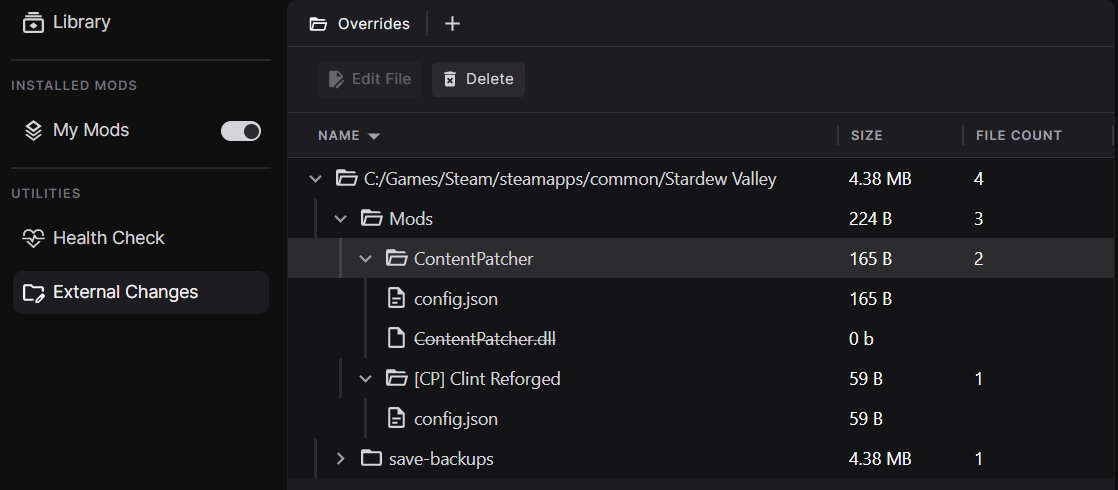
When managing your game for the very first time, any files that aren't part of the base game will be displayed here and can be quickly removed if you want to clean your game folder for a fresh start. Future development of this feature will allow you to add these files to your loadout as mods.
More Features
- Collections from Nexus Mods are now installed in a read-only state to ensure the collection is as the curator intended it. Cloning and editing collections will be added in future.
- The Collection Download page now includes an Instructions tab with both collection and mod instructions.
- Collections can now be removed from loadout without deleting them from the Library using the menu option in the header.
- The header has been redesigned to be more compact.
- The Settings UI has been updated to match the latest brand guidelines.
- Stardew Valley mods that are packaged without a top-level folder will now install correctly.
- Added more information to the Health Check diagnostics for Stardew Valley.
Technical Changes
- All games except Stardew Valley have been moved behind the "Unsupported Games" flag in Settings. If you were modding Cyberpunk, Baldur's Gate 3 or Mount & Blade II: Bannerlord in a previous release, you will need to enable this option to continue managing your mods.
- The app can now differentiate between a mod installed as part of a collection and the same mod installed directly from the Library.
- When installing collections for Stardew Valley, any unrecognised mods are now installed relative to the "Mods" folder instead of the game folder.
- Conflicting mods within a collection are now installed in an order that respects the rules set by the curator.
- Large numbers are now displayed with comma separation or abbreviations.
- File sizes now only show decimal places above 1GB.
- Edits to mod files are now saved to External Changes instead of merging into the source mod.
- Added a new "Give Feedback" button to the bottom of the main window.
- When two different versions of the same SMAPI mod are installed into the loadout, diagnostics will use the most up to date version to display messages.
- Errors communicating with the SMAPI server will now silently be recorded in the logs rather than showing a pop up.
Bug Fixes
- Mod updates now correctly show the number of mod files with updates rather than the number of new versions between the current and latest releases.
- The left menu now displays the correct name of a collection if the internal manifest and website don't match.
- A Command Prompt window will no longer be open behind the app on Windows.
- The Success Rating for a collection now shows the correct value.
- If a collection has less than 3 votes on the Success Rating, it shows as grey instead of red.
- Collections with no required mods can now be installed.
- Fixed multiple places where the app UI would freeze when making large numbers of changes in quick succession.
- Fixed an issue where the workspace could be broken by a saved page no longer being available.
- Fixed an issue where the SMAPI version and game version comparison diagnostic was not running correctly.
Known Issues
- The sort order for some columns does not work as expected.
- The game version is not checked when adding a collection meaning you can install outdated mods without being warned.
- The table header sorting and collapsible section states are not saved and reset each time the view is loaded.
0.7.3
The release adds collections to the Library, introduces thumbnails for mods, and includes significant usability improvements for the left menu.
Collections in the Library
Important: If you are updating from 0.7.1, you will need to remove and re-add any collections to your library.
Collections are now available at the top of the Library. The new section appears once you have at least one collection installed and can be collapsed. In addition, installed collections can be easily toggled on and off from the left menu.

All collections downloaded from Nexus Mods will be in a read-only state when added to your loadout which ensures you get the full experience the curator intended. In future, users will be able to make copies of existing collections to edit them.

We've also made improvements to the experience of downloading and installing collections by adding more useful information to the Collection Download page and the Collection tiles in the library.
As an added bonus, a button will show in the UI when a collection has been updated allowing the latest revision to be downloaded - mod updates are coming soon!
Workspace Improvements
We've made several improvements to the behaviour of the left menu in your Workspaces:
- The left menu has been reorganised with the Library at the top, the mods in your loadout in the middle, and the extra utilities at the bottom.
- Pages in the left menu will now show active/selected states based on which panels/tabs are open and in view.
- Tooltips have been added to the left menu items so you can always see the full name.

Mod Thumbnails
We've added the mod page image as a thumbnail in the Library, My Mods, and Collection Download pages. It's a small change, but we think it makes a big difference.
Technical Changes
- Added a new error pop-up when the app encounters an unexpected error. This can be turned off in the Settings.
- Added CLI commands to allows users to delete files from the hidden Override folder where this has compromised their setup.
Bug Fixes
- Fixed Health Checks not refreshing properly when the Loadout changes.
- Fixed an issue when installing Baldur's Gate 3 Script Extender on Linux.
Known Issues
- On Windows, a Command Prompt window will appear behind the app while it is running.
- When viewing a read-only collection, it is still possible to toggle individual mods on and off, but this does not affect your loadout.
- Stardew Valley (Native Linux version) is not detected when installed via Heroic Launcher on Linux. The Windows version of the game can be used instead until this issue is fixed.
- Bundled mods included with collections do not appear in the UI but are still applied to your game.
- The success rating for collections does not show the correct value.
- The game version is not checked when adding a collection meaning you can install outdated mods without being warned.
- The "Switch View" option does not persist in the Library/Installed Mods view.
- The "Load Order" heading toggle does not persist in the Load Order view.
0.7.2
This release includes style updates for the Games, Loadouts and Health Check pages along with several important bug fixes.
UI Improvements
We've given several of the core app pages a face lift to match our latest branding changes. This includes the Games, Loadouts, and Health Check pages. You'll start to notice more stylised icons throughout the app.

File Conflicts
A small, but important improvement to File Conflicts has been included in this release. In previous versions, when two mods provide files with the same name, the conflict winner would be chosen at random. We didn't feel this made a lot of sense so now the mod most recently added to the loadout will always win the conflict. To adjust the priority of mods you can now remove the more important mods from the loadout and re-add them. This is a temporary solution which we work on building a UI for conflict management.
Bannerlord Software Extender support
Bannerlord players can now install and manage Bannerlord Software Extender (BLSE) with the app. The game will also be started with BLSE when configured. In addition, we've added some Health Checks diagnostics which show up when:
- Bannerlord Software Extender is installed but the
BLSE.LoadingInterceptororBLSE.AssemblyResolverdependencies are missing. - Bannerlord Software Extender is installed but Harmony is missing.
On Linux, the app will now start BLSE with the /forcenetcore argument to avoid any potential issues related to the users's WINE or Proton setup.
Technical Changes
- Free users will now see a modal prompting them to upgrade to Premium when clicking the "Download all" buttons for Collections. Downloading mods individually is still possible.
- When a loadout is removed, the associated Workspace data is now cleaned up.
- Reduced the number of log messages to make troubleshooting issues easier.
Bugfixes
- Fixed an issue where collections that include bundled mods would never be installable as it would always show pending downloads.
- Fixed an issue where users in timezones 6 or more hours ahead of UTC would be unable to download collections.
Known Issues
- Stardew Valley (Native Linux version) is not detected when installed via Heroic Launcher on Linux. The Windows version of the game can be used instead until this issue is fixed.
- Bundled mods included with collections do not appear in the UI but are still applied to your game.
- The success rating for collections is not showing the correct value.
- The game version is not checked when adding a collection meaning you can install outdated mods without being warned.
- The Collections (WIP) page is not filtered by game.
- The "Switch View" option does not persist in the Library/Installed Mods view.
- The "Load Order" heading toggle does not persist in the Load Order view.