Workflows+Adapters+Functions+Utilities Layered Architecture

The WAFUL Architecture (WAFUL) pattern describes a way of organizing code within an application or service. None of the ideas presented here are new or novel — my intent with WAFUL is to simply compile them together into a concrete set of recommendations that can be picked up and used immediately in a productive way.
As stated, none of the ideas that make up WAFUL are novel in themselves. So let's first cover the ideas that inspired and comprise (at least in part) WAFUL. Obviously this is not an exhaustive list — links to sources can be found throughout this document.
- Functional Core, Imperative Shell: This pattern is used as the primary organizing principle for domain logic — separating the business logic in a central functional layer while leaving the messy imperative bits in a separate layer.
- Transaction Script: From PEAA, this pattern describes a pattern for organizing domain logic. Basically, it's an imperative set of instructions and logic intermixed with direct database and external service calls. The most important piece is that the entire set functionality that makes up a single featurs is captured in one spot in a single Transaction Set.
- The Clean Architecture: A starting point for many, this architecture describes a way of combining/consolidating the ideas of other popular patterns (e.g. Hexagonal, Onion) into a general high-level description.

WAFUL strives to maximize a few different concerns.
This term is thrown around a lot, but it's absolutely crucial to the long-term success of any meaningful system. Testability basically means that you can easily isolate the parts of the system you wish to test from the parts of the system you do not wish to test (either because they are untestable, difficult to test, or testing them is low-value).
WAFUL features that contribute to Testability:
- Relegating side-effect-having code to the edge of the system in the form of
Outbound Adapters(CommandsandQueries). - Minimizing (or eliminating completely) the amount of logic intermixed with side-effect-having (imperative) code (
Functional Core, Imperative Shell) via the distinction betweenWorkflows,Functions, andOutbound Adapters. - Using Dependency Injection patterns to allow for mocking these side-effect-having components.
grok \grŏk\ : (verb) to understand completely and intuitively
coined by Robert A. Heinlein in the science-fiction novel Stranger in a Strange Land (1961)
I've chose to roll several different concerns under one umbrella: Grokability. Code should be obvious, as simple as possible, and its organization should be intuitive and consistent.
Code should be easy to read and understand by someone unfamiliar with the codebase or domain. When a developer picks up a story or bug, they should be able to intuit roughly where in the code changes need to be made and roughly what the structure of those changes should look like. This doesn't mean that experience with the codebase and/or domain is irrelevant, just that it generally shouldn't be a prerequisite for understanding what the code does. Changes should also be as localized as possible — a change to a single feature (be that a requirements change or a refactor of some kind) should not require changes to code that has nothing to do with that single feature.
WAFUL features that contribute to Grokability:
- Pushing all business logic into pure functions means that a reader does not have to keep note of external state or side effects when trying to comprehend the most important and complex part of the application.
- Keeping each Workflow as close to "a flat set of instructions" as possible means that a reader can more easily read the code and understand what it's doing without having to step through every method and class.
- Separating commands and queries makes it easy for a reader to clearly identify when external state is being read OR written, and these two distinct types of actions are kept distinct and separate.
- Using Hungarian Notation for naming classes and methods means that a reader can understand the basic intent of all method calls without reading the internal implementation of each method.
In this context, "maintainability" is synonymous with "resilience to change". We know that just about any system that does any meaningful level of work in the real world will be subject to change over time. Change could come in many forms, including changing business requirements, changing technical requirements, environmental changes, personnel changes, etc. WAFUL aims to reduce the impact and risk associated with change over time by striving for low coupling and high cohesion.
WAFUL features that contribute to Maintainability:
- Encapsulating an end-to-end business capability/feature within a single Workflow method makes it much easier to assess and identify required changes, and to see the impact of significant changes from a high level.
- Pushing all business logic to a pure functional layer makes reusability and composability simpler and easier to achieve.
- Using Vertical Slicing to organize code increases cohesion and makes change easier and less intrusive.
- Using Interfaces and Dependency Injection for Workflow access to Outbound Adapters, the impact of swapping out concrete implementations is localized.
Layers, which could also be thought of as component types, are the building blocks that make up WAFUL.
Workflows are conceptually similar to Transaction Scripts. They are a flat list of instructions (like a recipe) for how to accomplish some meaningful business function. Workflows should contain no logic — they should contain only invocations of Functions, Outbound Adapters, and other Workflows. The only if statements in a Workflow should be decision points for early returns/exceptions (e.g. a Workflow that edits a record but the ID is not found to exist). This is the primary deviation from the original Transaction Script pattern — the Workflow is comprised almost completely of reusable components.
So for instance, a "Modify Comment" Workflow of a theoretical "Comment" service might look like this set of instructions:
- Validate input JSON model (e.g. is the comment text not empty)
- Retrieve existing comment record from the database by ID
- Validate that the existing comment record exists
- Validate that the user has permission to edit this comment
- Modify the existing comment data (in memory) with updated input data
- Determine if the modified comment text is spam or otherwise requires moderation, modify data appropriately (e.g. with a "requiresModeration" flag that prevents the comment from being visible)
- Update database record
- If the comment requires moderation, notify admins
- Return updated model
Since Workflows contain no logic or business rules, they have to go somewhere — Functions. "Functions" here refers to the Functional Programming concept of pure functions. This means that Functions must be deterministic and have no side effects, and comes with two primary benefits. First, Functions are trivial to test. No mocking or intricate state setup required — provide inputs, assert outputs. Second, Functions are eminently reusable, which addresses one of the primary negatives of the traditional "Transaction Script" pattern by ensuring that we can rearrange and reuse our Function building blocks as needed without having to think about surrounding state or possible side effects.
Outbound Adapters serve as the interface between our application and the elements of the outside world that we rely upon. It is a THIN wrapper over external dependencies like databases, external services, and file systems. Absolutely no business logic should be placed in Outbound Adapters.
Inbound Adapters serve as the interface between our application and the elements of the outside world that rely upon us. It is a THIN wrapper over external triggers like an API framework, a UI framework, or CLI bindings. Absolutely no business logic should be placed in Inbound Adapters. For instance in .NET Core Web API project, this layer would typically be comprised of Controller classes that are invoked directly by the framework. These Controllers (or the framework itself) would handle an absolute minimum of concerns, including routing, parsing JSON/querystrings, parsing JWTs, etc.
Inevitably in practice there typically ends up being small bits of logic within the Inbound/Outbound Adapter layers that needs to be reused with the layer (e.g. querystring parsing helper functions). Place these bits of code in Utility functions in the layer where they are needed. These Utility functions should be completely agnostic of the business or application context. These should only be present in the Inbound and Outbound Adapter layers. Generally speaking, Utilities should be pure functions, but this may not always be possible in certain siutations or with certain frameworks.
There are a few code organization techniques that I have found work well within this architecture, and which are strongly suggested. These are not strictly required to achieve the core benefits of the architecture, but I do think they add significant value so I'm including them here. You can see these techniques being used within the example solutions in this repository. You should feel free to tweak or ignore any of these (or any part of this architecture, for that matter) to better suit your specific use case.
- Vertical Slicing: Organize code by feature/capability, THEN by technical type rather than the other way around. For instance, don't put all your Controller-type files in a single directory. Instead, put each Controller file alongide the Workflow, Function, and Outbound Adapater files that relate to it.
- Command Query Separation (CQS) in Outbound Adapters: Separate the code that writes/modifies external state (Commands) from the code that reads external state (Queries). Separate methods at least, ideally separate files.
- (Dependency) Injection of Outbound Adapters into Workflows: When Workflows invoke Outbound Adapater methods, it should be done via an interface rather than a direct reference to a concrete implementation, and this interface instance should be injected into the Workflow (e.g. via the Workflow's constructor). This is primarily for testability, but also allows for easier swapping of dependency concrete implementations for any other reason as well.
- Hungarian Notation (HN) for All Methods and Classes: This one may be controversial, but I'm not alone in making arguments in favor of it. I'm specifically talking about using HN for methods and classes (NOT for variables). Every single class and method in the application should have one of the following suffixes (feel free to swap out the specific suffixes used if you prefer). This makes the intent and structure crystal clear when reading any code in the application. Specifically when reading through a Workflow, you can easily see at a glance where and in what sequence data is being read, written, and transformed. Perhaps counterintuitively, it's hard to overstate the effect this technique has on readability.
- Classes:
- Controller
- Workflow
- Functions
- Query / Queries
- Command / Commands
- Utilities
- Methods:
- Controller
- Workflow
- Function
- Query
- Command
- Utility
- Classes:
This diagram shows what the call stack looks like in an WAFUL solution for a single Workflow.
TODO RH: Add screenshot of dotnet solution file structure
WAFUL lends itself perfectly to the classic Test Pyramid.
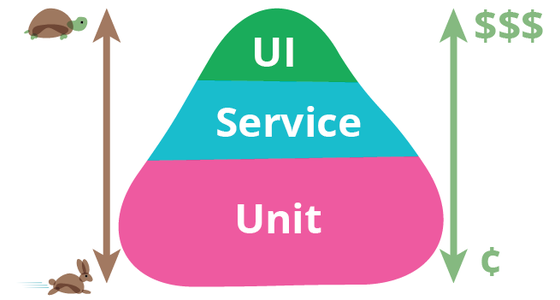
The vast majority of actual logic is contained in the Function layer, which is comprised of pure functions. These pure functions are a perfect match for Unit tests — no dependency mocking required! Most of your test code should be in the form of unit tests.
Testing terminology is pretty muddled, and I sometimes refer to "Service" tests as "Integration" tests, but you may disagree. Regardless of what label you put on this type of test, what I'm refering to here is tests that complete business capablity at the Workflow level.
In WAFUL, Service tests should be executed at the Inbound Adapter (Controller) layer. Outbound Adapters should be mocked, but otherwise Service tests should be executing application code at all other layers.
Service tests should be count fewer than Unit tests as they are more complicated to write and maintain since they require mocking for Outbound Adapters. One of the primary Testability benefits of WAFUL is that since little-to-no logic exists outide the Functions layer (and that layer has presumably already been throroughly tested via Unit tests), you should not need very many Service tests to get the confidence you need. As a rule of thumb, I generally create one Service test per Workflow return statement.
WAFUL provides no particular help or hindrance when it comes to E2E (or UI) tests, as by definition these tests should be completely agnostic with regard to your application's internal architecture. Per the Testing Pyramid, you should have the fewest number of E2E tests as they are expensive to write and maintain, and are slow to run.